Kiln is the open-source, click-to-edit CMS for static HTML sites. The people you invite sign in and edit by clicking the page. Every change is a Git commit to a repo you own — never locked inside Kiln.

HTML, CSS and JS files in a GitHub repo, written by you or by an AI. Astro sites too, self-hosted for now.
npx github:kilncms/kiln#release rescue <url> copies up to 50 pages of your live site into plain HTML files and tags them. From there it is a plain HTML site.
npx github:kilncms/kiln#release rescue <url> --render --menu-shim freezes the app into plain HTML you edit by clicking. It is a job for someone at home in a terminal, done once: Node 20, one small install, then that command. It keeps how the pages look, the text, the pictures, the links and the phone menu. Forms, accordions and anything else that needs the app's own JavaScript stop working, and the report the command prints lists each one. What you need, and what it costs.
Not yet Editing a React, Next.js, Vue or Svelte app in place, without freezing it first. Sites that sit behind a sign-in.
One set runs on your page and does the editing. One runs on Cloudflare and handles sign-in and commits. They work against a GitHub repo and the host you choose. No database, no build server.
Run both sets yourself for free, or let Kiln run them for you. See the three routes below.

A site built by hand or by AI ships as plain HTML in a repo: fast, cheap to host, hard to change. The moment someone non-technical needs to fix a phone number or add an event, they're stuck, because editing means a code editor, a commit, and a deploy. Kiln adds the missing layer. The people who run the site sign in and edit it on the page, the HTML in your repo stays the only source of truth, and every change is still a normal Git commit.
Editors change words and pictures by clicking the page; the layout and design stay exactly as you built them. v0.4.0 adds a review loop, a block library, theme tokens, a command palette, and a write API — still the same page-is-the-CMS idea. The docs walk through how each one works.
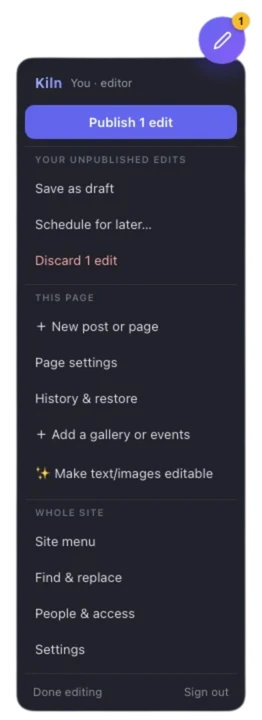
/kiln, edit, publish. Visitors never see any of it.Click any text and type. Bold, links, lists, and headings, plus the site styles you defined in CSS as the palette, so formatting stays on-brand.
Click a photo to replace it (auto-compressed for the web), set its display size, or shrink the file. Insert images and PDFs anywhere in a paragraph, as a link, a chip, or a card.
Cards, team lists, schedule rows: duplicate, reorder, remove. Tag any block and visitors get automatic filter buttons above the list.
Source mode: the pages are generated from content files, so you edit the page, Kiln saves the underlying content and the site rebuilds. Today that covers plain text, dates, times, numbers and yes/no values; formatted text, pictures and adding or removing entries are still done in the files. Self-hosted only for now. How source mode works.
Turn any photo area into a gallery. Editors upload many photos at once; visitors get a grid and a full-screen lightbox with paging and captions.
Add events through a form (date, time, location, link). Visitors switch between list, month, week, and day views, rendered from the same content.
A new post writes the article and its listing card in one commit. New standalone pages come from your template. No build pipeline.
Every publish is a Git commit. Save drafts, schedule for later, name a version, and restore with a side-by-side “now vs then” preview. Publish status follows your host: Live ✓ when the deploy actually landed.
Add people by Google email, no GitHub account needed. Scope editors to pages or sections; put someone in Suggest-only or give them a Reviewer seat (comment-only). Members get gated /members/ pages and files.
Visitors load a ~3 KB shim; pages with galleries or calendars add one ~5 KB file. The full editor loads only for people signed in at /kiln. On a phone it becomes bottom sheets. Two editors on one page see each other.
Pin a comment to any element on the live page. Threads, resolve and reopen, a sidebar per page. A Reviewer seat comments and nothing else — the worker refuses every write.
Tick Suggest-only on an editor and their Publish becomes Suggest changes. You approve or decline field by field, with a before/after. They cannot write to the live branch.
Name any publish, then restore with a sandboxed side-by-side “now vs then” preview before anything is staged.
“+ Add section” composes a page from your repo’s approved _blocks/ snippets. The Theme panel turns the site’s own CSS variables into color, font, and size controls — byte-exact stylesheet commits, no new schema.
Jump to any page, field, or tool. Search the site’s text with in-context snippets, scoped to what an invited editor can see.
A REST API and kiln-mcp let scripts and agents edit the same fields, scoped and sanitized. AI assist is optional and Self-hosted only: it uses an API key you put on your own worker. Kiln does not sell a hosted AI plan.

You connect a GitHub repo and the worker. With the wizard, plan on 15 to 25 minutes on Kiln Cloud and 30 to 45 if you run the worker yourself. The repo can stay yours, or belong to your client. After that, editing happens at yoursite.com/kiln.
Anyone you add can change content: your client, their team, or you. Add their Google email, they sign in with Google and edit. No GitHub account, nothing to install. You can also limit an editor to certain pages, like just the blog.
A comment-only seat. They pin notes on the live page; they cannot publish, suggest, or change a word. The worker refuses every write for those sessions.
People who only need to reach your gated pages. Add them by Google email, just like editors, and they sign in to unlock the members-only pages and files for as long as you allow.
WordPress can't really be hosted for free: it needs a database and an app server running around the clock, and someone has to pay for those. Kiln needs neither. Your HTML files are the database, a static host serves them, and one free Cloudflare Worker handles sign-in and commits. If you self-host, the whole stack is free! The paid routes exist if you'd rather not run the worker, or not run anything at all.
| Edit on the page | Any static HTML | Backend to run | Upkeep & ease of use | Price | |
|---|---|---|---|---|---|
| Kiln | Yes | Yes | One small worker | Low, set up once | $0, open source |
| WordPress | Partly | No, PHP and themes | Server, DB, patches | High, constant updates | $5 to 25+/mo |
| Squarespace, Webflow | Yes | No, their platform | n/a | Low, but locked in | $16 to 25+/mo |
| CloudCannon | Yes | SSGs only | n/a | Low, hosted for you | $45+/mo |
| Decap, Sveltia | No, a form dashboard | Yes | None, Git | Fiddly to wire up | Free |
Your repo is yours on all three. The editor is the same too, apart from two things that are Self-hosted only today: source mode for Astro sites, and AI assist.
Free forever, open source (AGPL-3.0)
$4.99 / mo per site · 7-day free trial
npx github:kilncms/kiln#release to prep your repo$14.99 / mo per site · 7-day free trial
There are two pieces of infrastructure. The routes differ in who runs them and who does the setup.
| Self-hosted | Kiln Cloud | Fully managed | |
|---|---|---|---|
| Site repo (your content) | You | You | You |
| Static host | You | You | Kiln |
| Sign-in & commit worker | You deploy it | Kiln | Kiln |
| GitHub App | Yours, wizard makes it | Kiln's, on your repo | Kiln's, on your repo |
| Making pages editable | Wizard or your AI | The npx command | Kiln does it |
| Google sign-in for editors | Your own OAuth client | Included | Included |
| Leaving Kiln | Delete two script tags — your site is already plain HTML in your repo | ||
Which is for me? Comfortable in a terminal and want it free, start with Self-hosted. Want to skip running the worker but keep your own host, Kiln Cloud. Want to touch none of it, Fully managed. Your content lives in a GitHub repo you keep on all three. If you change your mind later the repo stays where it is and the setup around it is redone: what that takes.
A kiln turns soft clay into something that lasts. Kiln turns a click into a Git commit: plain HTML in a repo you control, with every version kept. Nothing to export later, because your code never left your hands.

It is the same editor on all three. Two things work only on Self-hosted today: source mode for Astro sites, and AI assist, which needs an API key on a worker you run. Everything else that differs is who runs the infrastructure.
Yes, in any direction, and your repo never moves. What you redo is the setup around it. Going from Kiln Cloud to Self-hosted you deploy your own worker, register your own GitHub App, set up your own Google sign-in, point kiln-config.js at the new worker, and add your editors and members again. The list of people is kept with the worker, so it does not come with you, and neither do comments, suggestions, scheduled posts or API tokens. Self-hosted to Kiln Cloud is the same trip the other way. Moving to or from Fully managed also moves the hosting.
Always. Every edit was a commit to your own GitHub repository and the content is already yours. Removing Kiln entirely is just deleting two script tags in your HTML.
Sites whose pages are plain HTML, CSS and JS files in a GitHub repo, on any host that redeploys on push (Cloudflare Pages, Netlify, Vercel, GitHub Pages). It makes no difference whether you or an AI wrote the files. Astro sites work too, self-hosted for now. A React app from Lovable, v0 or Bolt works once you freeze it into plain HTML with one command. Kiln does not edit React, Next.js, Vue or Svelte code in place.
Lemon Squeezy, our authorized reseller and merchant of record. Monthly, recurring; cancel any time and keep access through the period you paid for. Details on Pricing.
Kiln is open source (GNU AGPL-3.0), free for any use, including commercial and client work, for your own sites. GitHub repos are free. Cloudflare Pages hosts the site on a free tier that allows commercial use, and a free Cloudflare Worker handles sign-in and coordinates every commit. The catch is that you self-host those two free things. The wizard walks you through it; plan on 30 to 45 minutes the first time.
No. Whoever owns the repo signs in with GitHub. Everyone else, your client, their team, or members, signs in with Google. Their changes are committed on their behalf and attributed by name.
That is the whole point. Editors change content, not layout. Text, images, links, list items, menu entries: yes. Dragging boxes around: deliberately not. If you grant it, the Theme panel edits the site’s own CSS variables — colors, fonts, sizes — as a brand kit, not a freeform designer. Styles still come from CSS you own.
No. AI assist is optional and Self-hosted only: it uses an API key you put on your own worker, so Kiln Cloud and Fully managed sites do not have it. Kiln does not sell a hosted AI plan. On every plan, the REST API and kiln-mcp let you point your own assistant at the site with a scoped token.
npx github:kilncms/kiln#release new scaffolds a fresh site from a template. Leaving Squarespace, Wix, or WordPress? npx github:kilncms/kiln#release rescue <url> crawls your live site into a clean static copy and tags it for Kiln. Plain rescue reads each page as the server sends it, so for a site that only appears once JavaScript has run in the browser, add --render: how that works.
The sign-in worker runs on Cloudflare Workers, which are free. Your site itself can live anywhere that auto-deploys from GitHub. Cloudflare Pages is recommended because it is free and allows commercial use, but Vercel, Netlify, and GitHub Pages work too. On Fully managed, Kiln handles hosting for you.
It depends on what the AI built. If it wrote plain HTML, CSS and JS files, yes: paste KILN_PROMPT.md into the same AI along with the site, and it adds the two script tags and marks what is editable. If it built a React app, which is what Lovable, v0 and Bolt usually generate, Kiln cannot edit it in place: in those apps the words live inside code. Freezing the site into plain HTML that you edit by clicking is done once, in a terminal (Node 20, one small install, then npx github:kilncms/kiln#release rescue <url> --render --menu-shim). If you built the site without ever opening a terminal, ask someone who has one. A brochure site comes across looking the same. Forms, sign-in and anything else that needed the app running stop working, and the report lists each one. From then on you change the site in Kiln, not in the AI builder, because a new export would have to be frozen again. What you need, and what it costs. A site that is already live on Squarespace, Wix or WordPress.com can be copied into plain HTML with npx github:kilncms/kiln#release rescue <url>.
 Kiln
Kiln